Program Mode Explained: Customizing Shot Volumes on Breville
Master Program Mode on Breville Barista Express. Step-by-step guide to customizing shot volumes for perfect singles and doubles every time.
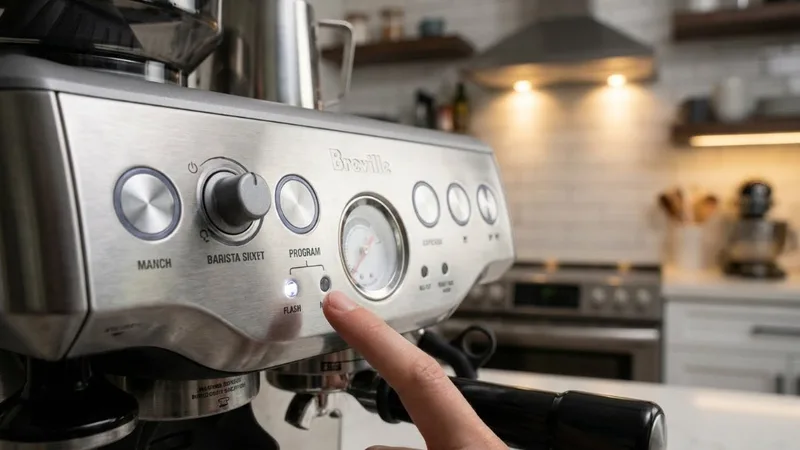
Got my Barista Express and immediately wondered why the double shot button gave me barely an ounce of espresso. Definitely not the 2oz I was expecting for lattes. Turns out the factory settings are way off from what most people actually want.
The fix? Program Mode. It lets you tell the machine exactly how much espresso to pull when you press the button. Changed my workflow completely once I figured it out.
What is Program Mode?
Program Mode lets you override the factory extraction volumes for both the 1 CUP and 2 CUP buttons. When you activate it, the machine records how much espresso flows during your next shot and saves that as the new default.
Factory Default Volumes
| Button | Default Volume | What Most People Want |
|---|---|---|
| 1 CUP | ~30ml (1oz) | 30-45ml |
| 2 CUP | ~40ml (1.4oz) | 60ml (2oz) |
That 2 CUP default is the main problem. Most recipes call for a 60ml double shot. Program Mode fixes this permanently.
Step-by-Step: Entering Program Mode
Before You Start
Make sure you have:
- Fresh coffee loaded and tamped in your portafilter
- Scale under your cup to measure output precisely
- Machine fully heated—wait 10-15 minutes after turning on
Resetting to Factory Volumes
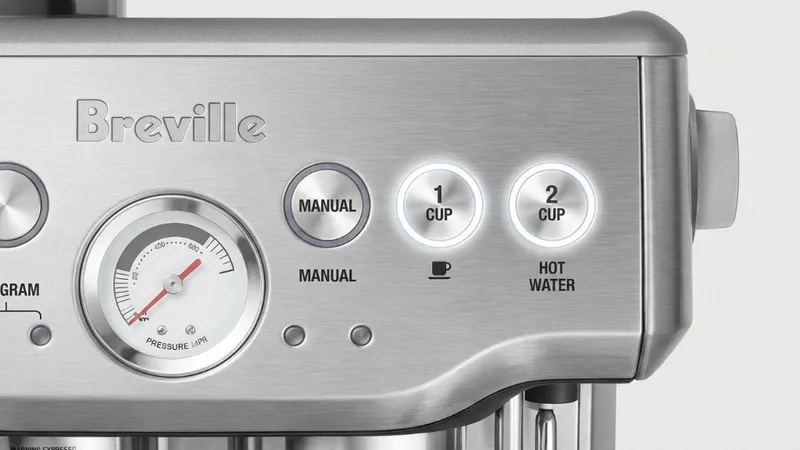
Experimented too much and want a clean slate? Easy reset:
- Hold PROGRAM button for 3 seconds
- Wait for 3 beeps—confirms reset
- Both buttons back to factory volumes
Activating Program Mode
- Press PROGRAM button once
- Listen for single beep
- PROGRAM button starts flashing
- Insert loaded portafilter into group head
Machine is now ready to record a new volume.
Programming Your Shot Volumes
Programming the 1 CUP Button
To customize your single shot:
- With PROGRAM button flashing, press 1 CUP
- Extraction begins—watch your scale
- When you hit target weight (e.g., 30g for 1:2 ratio on 15g dose), press 1 CUP again
- Extraction stops and volume saved
Programming the 2 CUP Button
For double shots (what most people care about):
- With PROGRAM button flashing, press 2 CUP
- Extraction begins
- Target roughly 36-40g output for an 18g dose (1:2 ratio)
- Press 2 CUP again when scale hits target
- Volume saved permanently
Pro Tip: Program by weight, not time or visual volume. Aim for 1:2 ratio (input:output). 18g dose → 36g espresso.
Understanding Shot Timing vs Volume
Here’s something important: the Breville doesn’t actually measure volume. It measures pump run time. When you program a shot, you’re telling it “run the pump for X seconds.”
This means actual output varies depending on:
- Grind size—finer = slower flow = less volume in same time
- Dose—more coffee = slower flow
- Coffee freshness—fresh beans flow slower
What this means for you: If you significantly change grind or dose, you may need to reprogram. I reprogram whenever I switch beans.
Troubleshooting Program Mode
Program Button Not Flashing
What’s happening: Machine not ready or button not pressed right
Fix:
- Confirm machine is fully heated
- Press PROGRAM button firmly but briefly—one press only
- Wait for that single beep
Volume Varies After Programming
What’s happening: Changes in grind, dose, or coffee freshness
Fix:
- Keep your recipe consistent day-to-day
- Reprogram when adjusting grind significantly
- Reprogram when switching beans
Extraction Won’t Stop
What’s happening: Forgot to press the button again
Fix:
- In Program Mode, you must press the same cup button to stop
- If it overruns, press the button, then reprogram with new shot
Program Mode vs Manual Mode
You’ve got two ways to pull shots:
| Feature | Program Mode | Manual Mode |
|---|---|---|
| How it works | Pre-set volumes | Hold button, release to stop |
| Best for | Daily consistency | Experimentation |
| Attention required | None—walk away | Yes—watch the scale |
| Adjusts automatically | No | Yes (you control it) |
Manual Mode: Hold 1 CUP or 2 CUP to start. Release when you hit target weight. Super useful when dialing in new beans.
Program Mode: Press once, walk away. Machine stops automatically. This is what you want for your morning routine once dialed in.
Best Practices for Programming
For Light Roasts
Light roasts need longer extraction to get sweetness. Program your 2 CUP to pull longer—maybe 40g+ output—to avoid sour shots.
For Dark Roasts
Dark roasts extract faster and turn bitter quickly. Program shorter pulls (32-36g output) to prevent over-extraction.
For Milk Drinks
Making lattes and cappuccinos? Slightly shorter shots (30-34g) can help espresso punch through that milk better.
Frequently Asked Questions
How do I reset Program Mode to factory defaults?
Hold PROGRAM button for 3 seconds until you hear 3 beeps. Both 1 CUP and 2 CUP return to factory.
Can I program shot time instead of volume?
You’re technically always programming time—machine measures how long pump runs. But using a scale gives more consistent results than watching a timer.
Why is my programmed 2oz shot pulling more?
Minor overflow after stopping is normal—residual pressure pushes a bit more through. Stop slightly early to account for it.
Does programming affect pre-infusion?
Nope. Pre-infusion happens before your programmed extraction time. The volume you save starts after pre-infusion completes.
Related Guides:
Mikael
Home espresso enthusiast and Breville specialist. Helping you master the art of coffee brewing from your own kitchen.
Learn more about me →